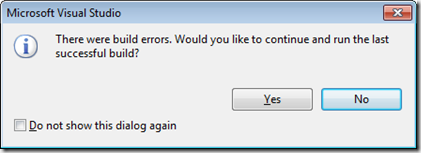
What’s Wrong with this Picture Answer

image

Why is this stoopid?

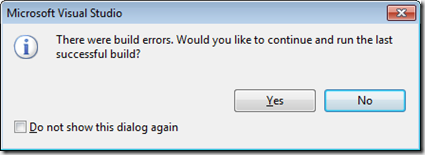
There is nothing wrong with letting you run the program from the last successful build. Perhaps you want to quickly show somebody what your program looks like, but you are in the middle of editing it. In this case you just click Yes and that person can see your program running, even though it won’t build at the moment.

The problem for me (as some of you have already spotted) is the nasty “Do not show this dialog again.” check box. If you check that it means that Visual Studio will always run your last successful build without giving you a message. The scenario where this bites you is as follows:

  1. Run program, notice an error.
  2. Edit source code, fix error but forget to type semi-colon, leading to a compilation error.
  3. Run program again to see if error has been fixed. Program fails to compile, so Visual Studio runs the old old version without telling you. The error appears to be still there.
  4. Go nuts trying to find the error that you have already fixed. Every change you make has no effect. Give up programming and become a beekeeper.

An experienced programmer will be looking out for compiler errors and will know that they are running old code. But not everyone will. You can get a similar effect by working on the wrong source file. In that case you got the fix right, but a file somewhere else is being used in the build. If I suspect a “reality fault” like this I do something that is guaranteed to break the build:

wobble;

This should not compile and run. If it does, something else is happening. If you want to put this back to how it should be (in my opinion) you can go to Visual Studio Tools>Options and find the following entry:
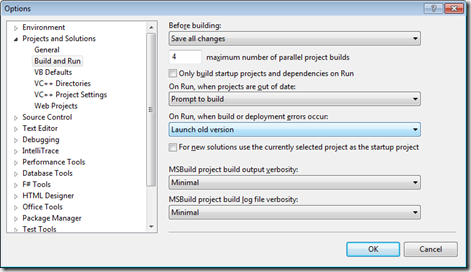
image

Change “Launch old version” to “Prompt to launch”.
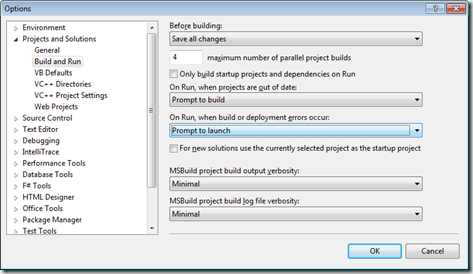
image

If you want to get rid of the dialog box completely, and never have the program run when it won’t build, change it to “Do not launch”.

I’ve been racking my brains as to why you would want to hide the dialog box and always run the old version. To be honest, I can’t think of a reason why you’d want to do this, and I’d be a bit happier if the folks at Visual Studio hadn’t.
Poolside Programming with the C# Yellow Book

df5jg[1]mc6oc[2]

Russell, who has signed up to be in our First Year starting in September, shows how he is getting ahead of the game by taking the C# Yellow Book for some poolside programming in Fuerteventura. Good stuff.

It seems that the Yellow Book is looking a little pasty this year. I was going for an artistic shade reminiscent of dappled sunlight through tall tress in spring. Unfortunately I got muddy white. But don’t worry, the next Yellow Book is going to be the yellowist yellow you have ever seen. I’m presently working on updates for the content. Remember that you can get your own, completely free, PDF version of the book from www.csharpcourse.com I’ll put the new version up when I send it to the printers for copies for next year.

TouchStudio for Windows Phone

image

If you want to create programs on your Windows Phone 7 device you can of course use the delightful Iron7 implementation of Ruby. This works startlingly well, but using it you are painfully reminded of the fact that mobile phones are best suited for consuming programs, not creating them.

TouchStudio is a project from Microsoft Research that aims to change that a bit. It has been designed from the ground up to work with a touch interface, rather than in spite of it. The commands and the syntax of the language have been created to make it easy and engaging to write applications for the phone, on the phone. There is a nice paper that sets out how it works here here and the project web site here. If you search Windows Phone Marketplace for TouchStudio you can download the latest version for free.

The programming model is easy to pick up, although the language syntax is different from ones you might have seen before. I don’t see this as a bad thing actually, I reckon that programmers should be used to the idea of using different types of language. What makes it stand out for me is the ease with which you can create stuff, and the level of integration they have with the phone. You can work with pictures, maps, music and even set up phone calls from within the language. The web integration is very good, in around 10 minutes I had a program that would fetch my Xbox avatar, convert it to black and white, display it and then save it as a picture on my phone:

My first TouchStudio program

I need to do a bit of scaling and tidying up, but the program itself is simple enough:

action AvatarDisplay() : Nothing { 
  pic := web->download_picture('http://avatar.xboxlive.com/avatar/rob the bloke/avatar-body.png'); 
  pic->desaturate; 
  pic->post_to_wall; 
  wall->screenshot->save_to_library; 
}

There are also a bunch of built in programs that play games or even do some simple image processing. This is what one of “\themify Picture” did to one of my photos:

Touch Studio Dalek

If you want to while away some time with your phone and actually achieve something fun and maybe even useful, you should grab a copy and have a play.

Making Great Games

100 Camera in 1

I’ve spent pretty much the entire day marking. I’m now giving grades to everything I see. I’ve been impressed with what our students have been getting up to this year, it always surprises me how many different takes you can get on the same problem. This year we were making Breakout. Many of the games that they made were good enough to go to market. Some have had really poor presentation but fantastic gameplay. Others went the other way, with lovely graphics but nothing worth playing. Some thoughts for game writers:

Get someone else to play. You might spend so much time admiring your scrolly graphics and particle effects that you forget that it has to be fun. Get other folks to play. You know you are on a winner when you find people playing who become better at your game than you are. And won’t let you back onto the machine to work on it.

Embrace serendipity. Some of the games had really strange collision behaviour that I’m sure wasn’t intentional. Their ball careered through bricks in really odd ways. However, this made the gameplay much more interesting than some of the better behaved ones. If this sounds like some folks got more marks for writing imperfect code I must add at this point we weren’t marking gameplay as such, this was strictly a programming exercise. But it did bring home to me that if something strange happens you should investigate what is going on and not always fix it. Sometimes these things make good features.

Give the player control. Some games had fantastic graphics, sound, etc etc but the ball always bounced the same way off the paddle. Boring. Other games had very poor graphics but amazing ball and paddle interaction that really let you aim at things on the screen. Much more fun. Consider what happens at your average game of table tennis in real life. Not much happening graphically, but a fantastic range of shots available from a simple ball and bat combination.

Put the graphics on after the gameplay is sorted. In real life game developers often use empty “placeholder” graphics when building the game. This forces them to think about gameplay first. No amount of graphics will compensate for poor gameplay. So get the gameplay right before anything else, and then use the graphics to add value afterwards.

Enjoy your games. I got the feeling from many of the games that the students had really enjoyed writing them. There were little touches and flourishes that you would only add if you were really having fun writing the code. This is great, and just how it should be.

Static on the Radio

HypnoCube2

I was doing a C# revision lecture yesterday and I was talking about static class members. I mentioned the fact that every year some students write “Static means that the value of the variable cannot be changed” in the exam, which produces an anguished cry from me and zero marks. I was trying to think of a better way to explain what static really means. And I thought about the radio. If you turn on your am radio and tune it away from a station you will hear static. And that static hiss is always there. It has been there since before radios were invented and it will be there until the universe cools right down. Static class members are a bit like this. They are always there. They exist whether you make an instance of the class or not. Static in this situation doesn’t mean “can’t change” it means “always there”.

We use them in programs when we want a data member that is part of a class but not part of each instance. For example, in a bank we might have loads of accounts, but the minimum amount you can withdraw, the maximum size of the balance we can have and the minimum age for an account holder are all relevant to accounts, but not stored in each account instance. Static works well in this situation.